Ragdoll Realism Settings and Visual Effects Guide
Customize style and effects without killing frame rate or hiding limb reactions.
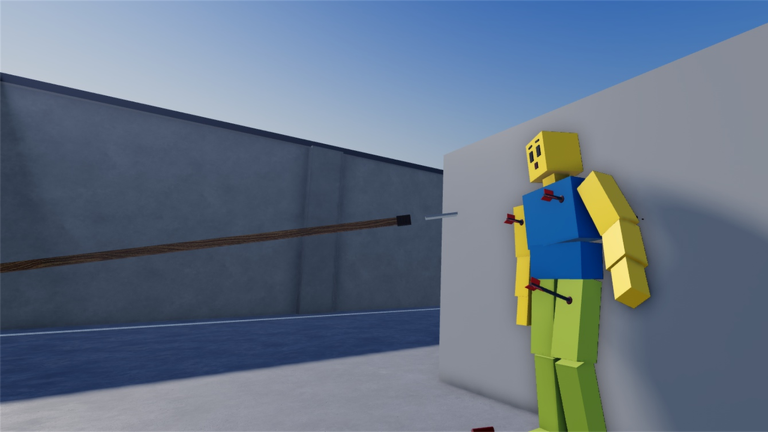
Ragdoll Realism sells readable physics: guns, melee, throwables, and physics tools that make limbs react in a satisfying way. The official Roblox pitch calls out Settings that let you customize visual style and effects. Those options are not decoration alone—they decide whether your session feels crisp or muddy, whether a headshot reads clearly, and whether a mid-range phone can keep aim honest during Survival waves or a four-player Sandbox pile-up.
This guide explains how to open Settings, how to think about visual style versus effect intensity, how to protect performance on weak devices, and how to pick presets that fit Sandbox clips, Survival, PvP, and timed scenarios. It stays honest: we do not invent slider names beyond the official language of visual style and effects. Pair it with Controls for input habits and Getting Started if you are still learning the Cash loop.
How to open Settings
Join Ragdoll Realism (place 81315647087659) by IsFluxHere. Look for the in-experience Settings entry in the UI—exact button placement can shift slightly after patches, but the panel is part of the advertised feature set. Also remember Roblox’s own client Settings (graphics quality, shift lock, sensitivity). Those sit outside the experience panel and still affect how the game feels.
A practical first open:
- Spawn and equip a starter weapon so you have something to fire after you tweak.
- Open Settings and note what visual style and effects options are available on your build.
- Make one change at a time, then exit and fire a single shot or swing at a dummy.
- Watch the full ragdoll reaction before you crank anything higher.
If the UI feels crowded on mobile, finish sensitivity and camera setup in Roblox client Settings first so you are not fighting tiny touch targets while you hunt for the experience panel.
Visual style vs effects intensity
Think in two layers:
Visual style shapes the overall look—how cinematic or clean the scene feels. Style choices can change contrast, color mood, and how “filmy” or sharp the world appears. For Sandbox highlight reels you may prefer a bolder style; for competitive PvP or scenario timers you usually want a cleaner look so enemies and hostages pop against the environment.
Effects cover the punch of weapon impacts, particles, and related feedback. Higher intensity sells spectacle; lower intensity preserves frame rate and keeps limbs visible through the noise. Ragdoll Realism’s fantasy fails when effects bury the physics you came to watch.
Rule of thumb: raise style only until the scene still feels like a lab you can study, and raise effects only until every hit still shows which limb moved. If you cannot tell where the last bullet landed, you overshot.
Performance on weak devices
Low-end PCs, older phones, and thermally limited tablets struggle when ragdoll piles, explosions, and high effects stack. Symptoms look like input lag even when your fingers are fine: delayed camera, sticky aim, missed Survival kites.
Performance checklist:
- Drop Roblox client graphics quality before blaming the experience alone.
- Lower effects intensity first—particles and impact spam are usually costlier than a style tint.
- Avoid filming long Sandbox chaos sessions at max settings on the same device you use for Ambush Escape timers.
- Close background apps on mobile; heat throttling feels identical to “bad hitreg.”
- After the Multiplayer update, expect more bodies and tools on screen—four-player sessions need stricter budgets than solo labs.
Stable 30–40 FPS with readable limbs beats a slideshow of max particles. Cash farming and scenario clears both punish stutter more than they reward spectacle.
Readability for limb hits
The skill that separates casual spam from useful experiments is observation. Fire once, watch the collapse, then decide. Settings that wash out contrast, overbloom impacts, or flood the screen with debris make that skill harder.
Readability goals:
- Keep enough impact feedback that melee and gun hits feel distinct.
- Prefer camera angles and style choices that leave silhouette edges clear on dummies and players.
- When using Sandbox Pack time controls, pair slower time with moderate effects so slow-motion still shows joint motion instead of a particle fog.
- In Survival, prioritize seeing zombie silhouettes over cinematic grit.
If you record clips, do a dry run at your “study” preset, then switch to a slightly richer style only for the take you keep. Do not grind Cash or clear Stop the Intruders on a recording preset that hides timers and paths.
Presets by mode (mental profiles, not fake UI names)
Ragdoll Realism may not ship named preset buttons for every mode. Build mental profiles and reapply them when you switch activities:
Sandbox clips
Goal: spectacle that still shows physics. Moderate-to-high style, effects high enough for punch but not so high that a launch becomes illegible. Use Sandbox Mode with deliberate single-impact tests. Unlock Sandbox Pack time tools when you want frame-by-frame study, then dial effects down a notch so slow motion stays clean.
Survival
Goal: tracking and movement. Cleaner style, restrained effects, stable frames. Waves punish tunnel vision; muddy visuals make kiting worse. See Survival Mode for pacing tips once Settings feel settled.
PvP and scenarios
Goal: information. Stop the Intruders (house clear + hostage rescue before the timer) and Ambush Escape (guarded compound, grab weapons, reach the exit) both punish missed callouts. Keep effects modest so doorways, hostages, exits, and enemy outlines stay obvious. Full tactics live in PvP & Scenarios.
Co-op agreement
After inviting friends (up to three others for four players total—see Play With Friends), agree on a shared intensity. If one player runs max effects and another runs potato mode, callouts like “left side, downed” stop matching what each person sees. Spend thirty seconds aligning Settings before a scenario push.
Settings and the rest of the loop
Settings do not replace progression. You still earn Cash in Sandbox or Survival and spend it on weapons plus the Sandbox Pack. Visuals only make that loop clearer. Promo codes are still unverified for this experience as of November 2026—check Codes instead of pasting strings from other ragdoll titles.
After major patches, reopen Settings. The Updates Hub tracks Multiplayer + Content and PvP + Scenarios; either drop can change how crowded a scene feels and whether your old intensity still runs smoothly.
Quick session routine
- Open Settings before the first serious fight or film take.
- Set a study/combat profile (clean, stable).
- Warm up with one Sandbox impact at that profile.
- Switch to a clip profile only when recording.
- Re-check frames when friends join or when you enter a timed scenario.
- Favor readability over maximum spectacle whenever Cash or a timer is on the line.
Related reading
- Controls — movement, tools, and why Settings count as soft controls.
- Sandbox Mode — freeform lab habits.
- Sandbox Pack — time controls and custom dummy spawning.
- Play With Friends — invite co-op and shared visual agreements.
- Getting Started — day-one loop.
- Updates Hub — patch context after visual or mode changes.
- Codes Hub — promo status (none verified as of November 2026).
Tune for clarity first. Flashy particles are optional; knowing which limb moved is the whole point of Ragdoll Realism.
Frequently Asked Questions
Quick answers to the most common Ragdoll Realism questions.
Where do I change visual style and effects in Ragdoll Realism?
Use the in-experience Settings panel. The official pitch highlights customization for visual style and effects. Also check Roblox client graphics and sensitivity settings.
Should I max effects for better ragdoll physics?
No. Physics readability matters more than particle count. Lower effects if you cannot tell which limb reacted or if frame rate makes aiming feel delayed.
Do Settings differ for Sandbox versus Survival or scenarios?
Use cleaner, stabler profiles for Survival, PvP, Stop the Intruders, and Ambush Escape. Save richer style and effects for Sandbox clips when performance allows.
Should friends match Settings in co-op?
Yes when possible. Matching intensity keeps callouts meaningful in four-player sessions after the Multiplayer update.
Will Settings unlock weapons or Cash?
No. Cash still comes from playing Sandbox or Survival. Settings only change how readable and smooth the session feels.