Play Ragdoll Realism With Friends
Invite up to three friends, share sandbox chaos, and clear scenarios together.
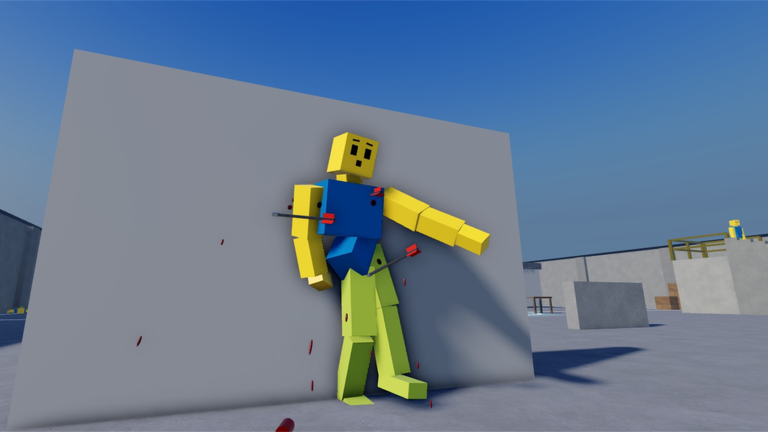
Ragdoll Realism began as a physics lab you could enjoy alone: test guns, melee, throwables, and physics tools on ragdoll dummies, grind Survival zombies for Cash, and unlock the Sandbox Pack. On November 6, 2026, the Multiplayer + Content update added co-op invite sessions so you can bring friends into that same fantasy. This guide is the practical “how do I play with friends?” page—invite flow, listing quirks, troubleshooting, mode tips, and why outdated “solo only” FAQs are wrong.
Creator IsFluxHere scheduled the drop with a short afternoon window around 3:20 p.m. ET. Once the tools are live in your client, treat invite co-op as a lasting feature, not a one-hour event mode. Deep patch context lives on the Multiplayer + Content update page; this article focuses on playing together day to day.
How invite co-op works
Documented ceiling: invite up to three friends for four players in one session (you plus three). Use the experience’s invite path after you join the official place (Ragdoll Realism, place id 81315647087659). Friends should favorite the same experience and accept from your invite rather than assuming they will land in your instance through random public matchmaking.
What co-op is good for:
- Shared Sandbox experiments—compare weapons side by side, stage dual launches, film group chaos.
- Survival waves with backup so one mistake is less likely to wipe progress.
- Scenario clears for Stop the Intruders and Ambush Escape with callouts and split roles.
- Teaching new players the loop while someone else holds a gun line.
What co-op is not: a massively multiplayer lobby shooter. Four is the documented session size. Keep expectations at “friend squad sandbox,” not “fifty-player war.”
Listing vs live UI (why some pages still say solo)
Some public Roblox API and listing fields have continued to show maxPlayers = 1 even after Multiplayer + Content. That mismatch confuses third-party FAQs that still claim the game is solo-only.
Source-of-truth order when docs conflict:
- Live invite UI inside the experience after November 6, 2026.
- IsFluxHere’s Multiplayer + Content scheduling and in-game messaging.
- This wiki’s Updates Hub and the dedicated multiplayer update article.
- Ignore copy-pasted “solo sandbox only” blurbs written before the patch or scraped from outdated APIs.
If a website still says you cannot play with friends, it is out of date. Confirm in-client: if you can invite and your friends spawn beside you, co-op is working regardless of what a listing field displays.
Troubleshooting when friends cannot join
Work through this list before assuming the feature is gone:
- Wrong place. Everyone must join place
81315647087659/ the official Ragdoll Realism experience—not a similarly named ragdoll title. - Invite path vs public hop. Friends should accept your invite into the session rather than pressing Play alone and hoping for a merge.
- Platform or privacy settings. Roblox privacy, account restrictions, or blocked follows can block invites; check who can join you in Roblox settings.
- Stale client. Force-close Roblox, update if prompted, relaunch, then invite again after a patch day.
- Session full. Four players is the cap—boot or wait if a fourth slot is already taken.
- Mixed expectations. One friend reading an old “solo only” FAQ may not look for the invite button; send them this page.
Still stuck? Have the host recreate the session, re-favorite the game, and invite one friend first as a smoke test before filling all three slots.
Sandbox co-op tips
Use Sandbox Mode as the default hangout. Assign loose roles so four people are not all swinging at the same dummy:
- One player runs melee impact tests.
- One focuses on guns at a fixed range.
- One handles throwables or physics tools.
- One films or calls timing if you are capturing clips.
Unlock the Sandbox Pack with Cash when the group wants time controls and custom dummy spawning. Shared slow-motion is excellent for teaching—just agree who toggles time so the session does not stutter between conflicting inputs. See Sandbox Pack.
Align Settings before big piles: matching visual style and effects intensity keeps callouts honest when limbs fly.
Survival co-op tips
Survival Mode still pays Cash while you fight zombie waves. Co-op shines when someone reloads and another covers, or when a downed lane gets peeled by a friend. Keep a simple rule: do not tunnel on one zombie while three others flank the group.
Cash remains a per-player economy. Playing together does not dump a shared bank into one wallet. Each friend earns and spends their own Cash on weapons and the Sandbox Pack. Talk unlock priorities so one player is not stuck on starters while others experiment with late toys—the Cash Checklist helps the squad agree on a buy order.
Scenario and PvP co-op tips
Timed scenarios from the PvP + Scenarios window work better with voice or quick chat:
- Stop the Intruders — clear the house, rescue hostages, beat the timer. Split rooms, call hostage status, avoid emptying magazines into empty corners.
- Ambush Escape — push a guarded compound, grab weapons, reach the exit. Assign a point player and a rear guard; loot with intent, not greed.
Friendly PvP inside a four-player session is different from stranger fights. Set rules in chat (first to X downs, sandbox goofs only, no spawn camping) before someone gets salty. Full mode notes: PvP & Scenarios and the PvP + Scenarios update.
Economy, codes, and creator follows
Multiplayer does not replace progression. Earn Cash in Sandbox or Survival, spend on unlocks, customize visuals in Settings, and keep grinding. As of November 2026 there are no verified promo codes for Ragdoll Realism—see Codes. Do not paste codes from Ragdoll Sword Battles, Hyper Realistic Ragdoll, Realistic Ragdoll Engine, Ragdoll Reality, or other lookalikes.
Follow IsFluxHere from the Creator Hub / Players so the next invite or content change hits your feed. Live stats around mid-November 2026 sat near roughly 7.8M visits and tens of thousands of favorites—popular enough that third-party pages lag behind real patches, which is why this guide exists.
Day-one co-op checklist
- Update Roblox and open the official place link above.
- Favorite the experience; follow IsFluxHere.
- Invite up to three friends; confirm all four (or fewer) share one session.
- Align Settings for readability.
- Warm up two minutes in Sandbox, then run one Survival wave or one scenario.
- Agree on the next Cash purchase before a long grind.
- Bookmark this page and the multiplayer update so outdated solo FAQs do not confuse the group later.
Play together inside the physics fantasy you already know—just with more hands on the dummies.
Frequently Asked Questions
Quick answers to the most common Ragdoll Realism questions.
Can I play Ragdoll Realism with friends?
Yes. The Multiplayer + Content update on November 6, 2026 added co-op invite sessions for up to four players (you plus three friends).
Why do some sites still say the game is solo only?
Public listing fields may still show maxPlayers=1, and older FAQs were written before the update. Trust the live invite UI and IsFluxHere’s Multiplayer messaging.
Is Cash shared in co-op?
No. Each player earns and spends their own Cash on weapons and the Sandbox Pack while playing Sandbox or Survival together.
What should we do if a friend cannot join?
Confirm the official place id, use invites instead of random Play, check Roblox privacy settings, relaunch clients, and ensure the session is under the four-player cap.
Which modes work well with friends?
Sandbox experiments, Survival waves, Stop the Intruders, Ambush Escape, and casual PvP all benefit from co-op. Align Settings and unlock goals before long sessions.
Where are patch details for multiplayer?
Read the Multiplayer + Content update page, then return here for invite troubleshooting and mode tips. Follow IsFluxHere from the Players hub for future drops.